Know which ads bring customers. Then let the ads know.

Dealroot Pro reports every qualified lead and won deal from your WordPress forms to Google Ads, Microsoft Advertising and Meta, with its value. Your campaigns learn which clicks pay off, and you see what each customer cost.

Works with 25 form plugins and page builders. Your forms stay as they are.

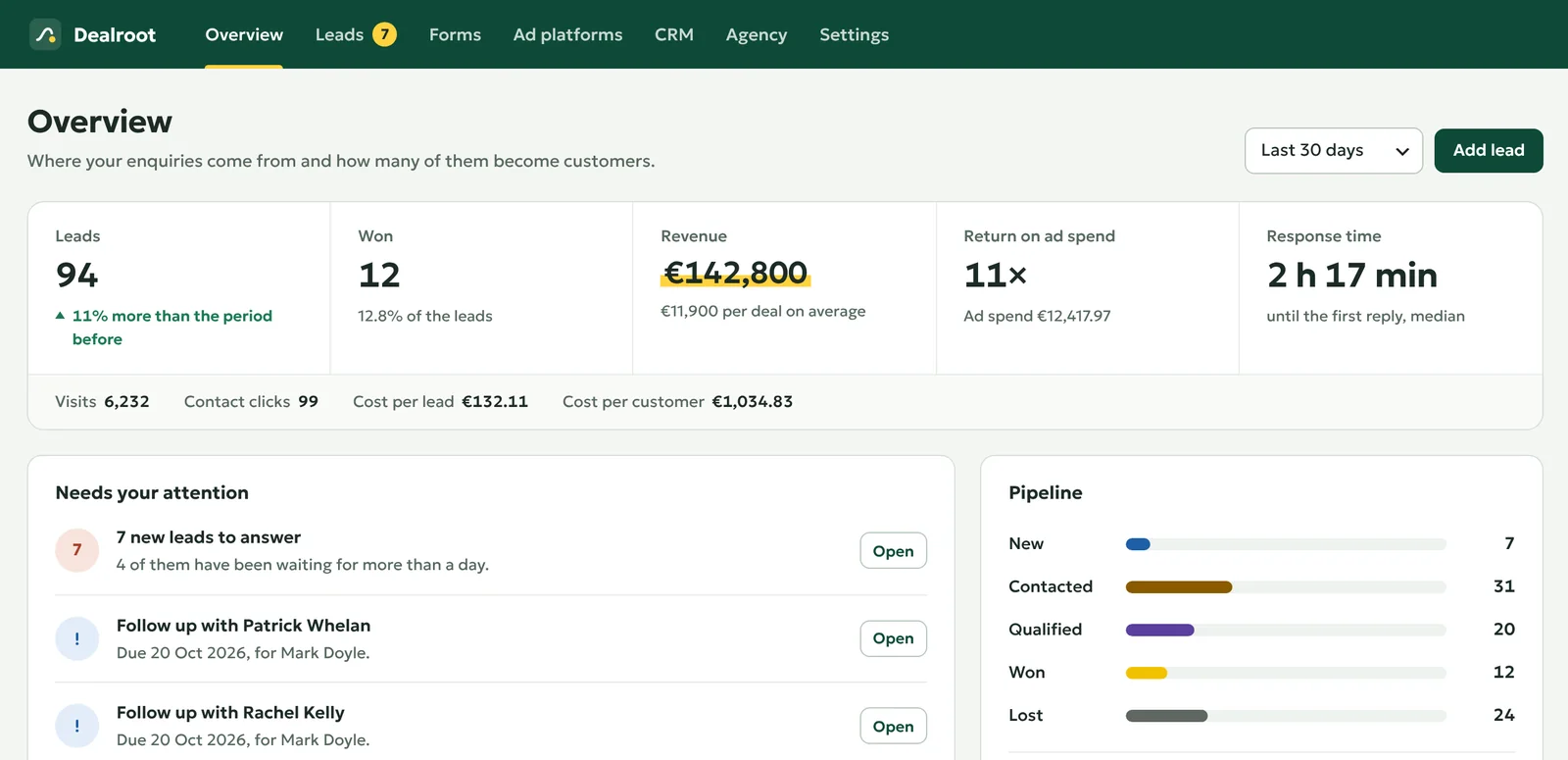
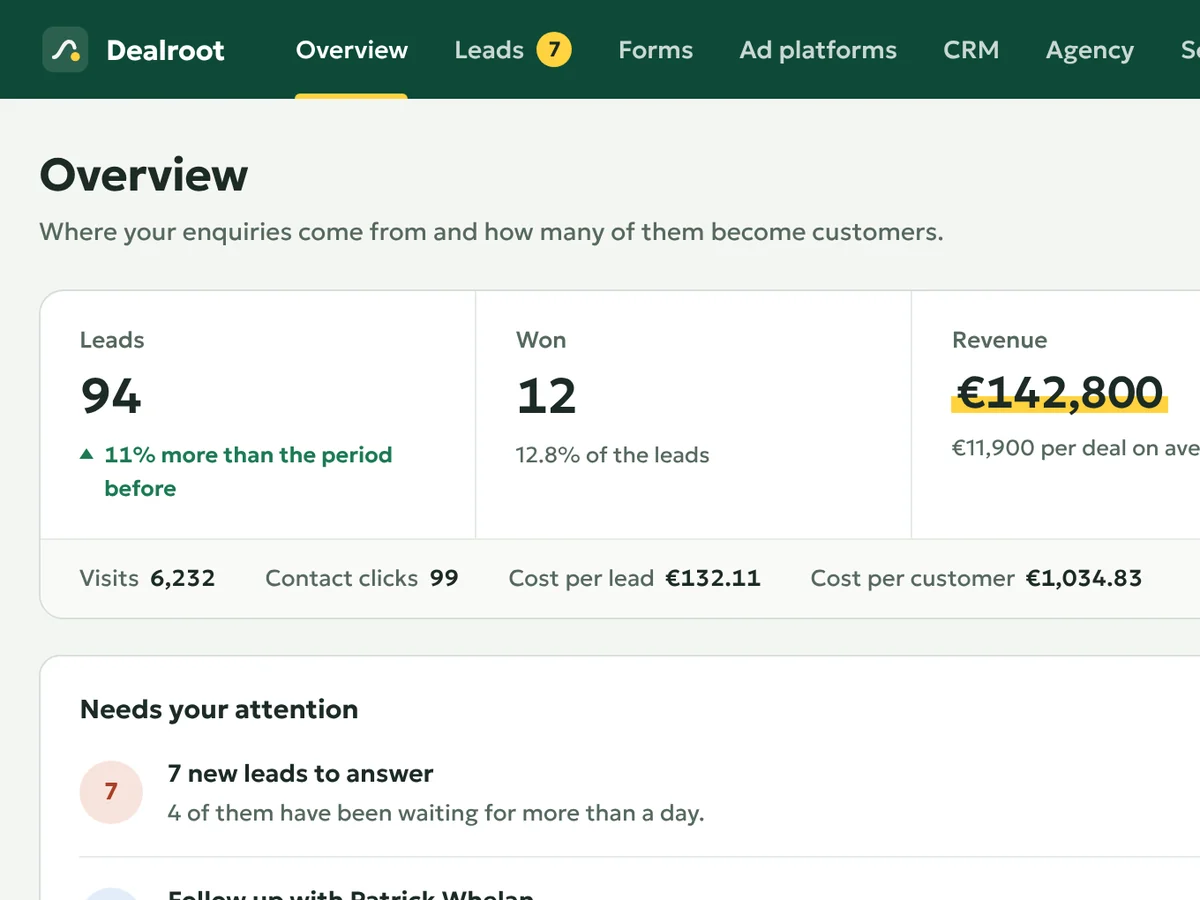
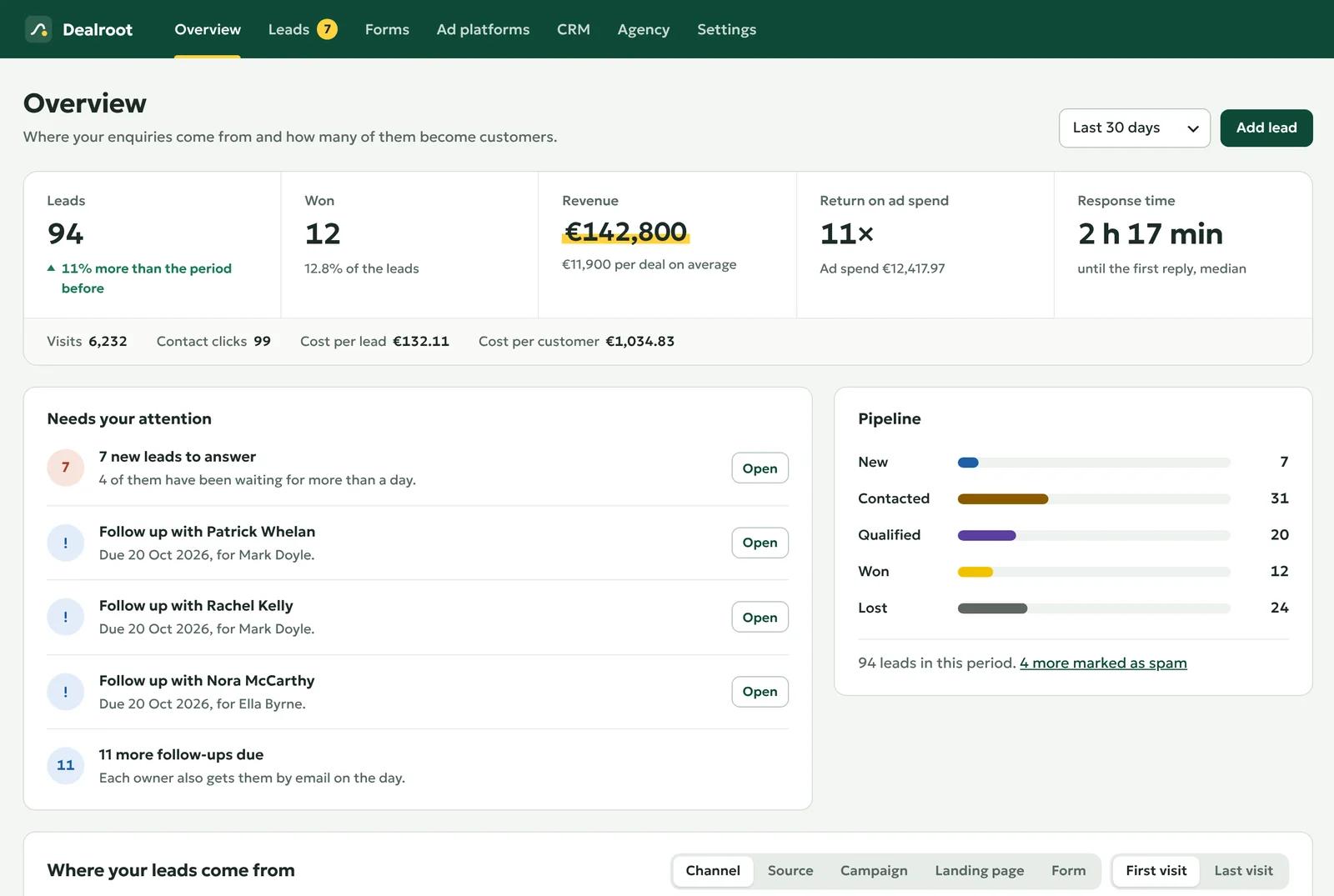
The Dealroot overview: leads, won deals, revenue, return on ad spend and the leads that need an answer.
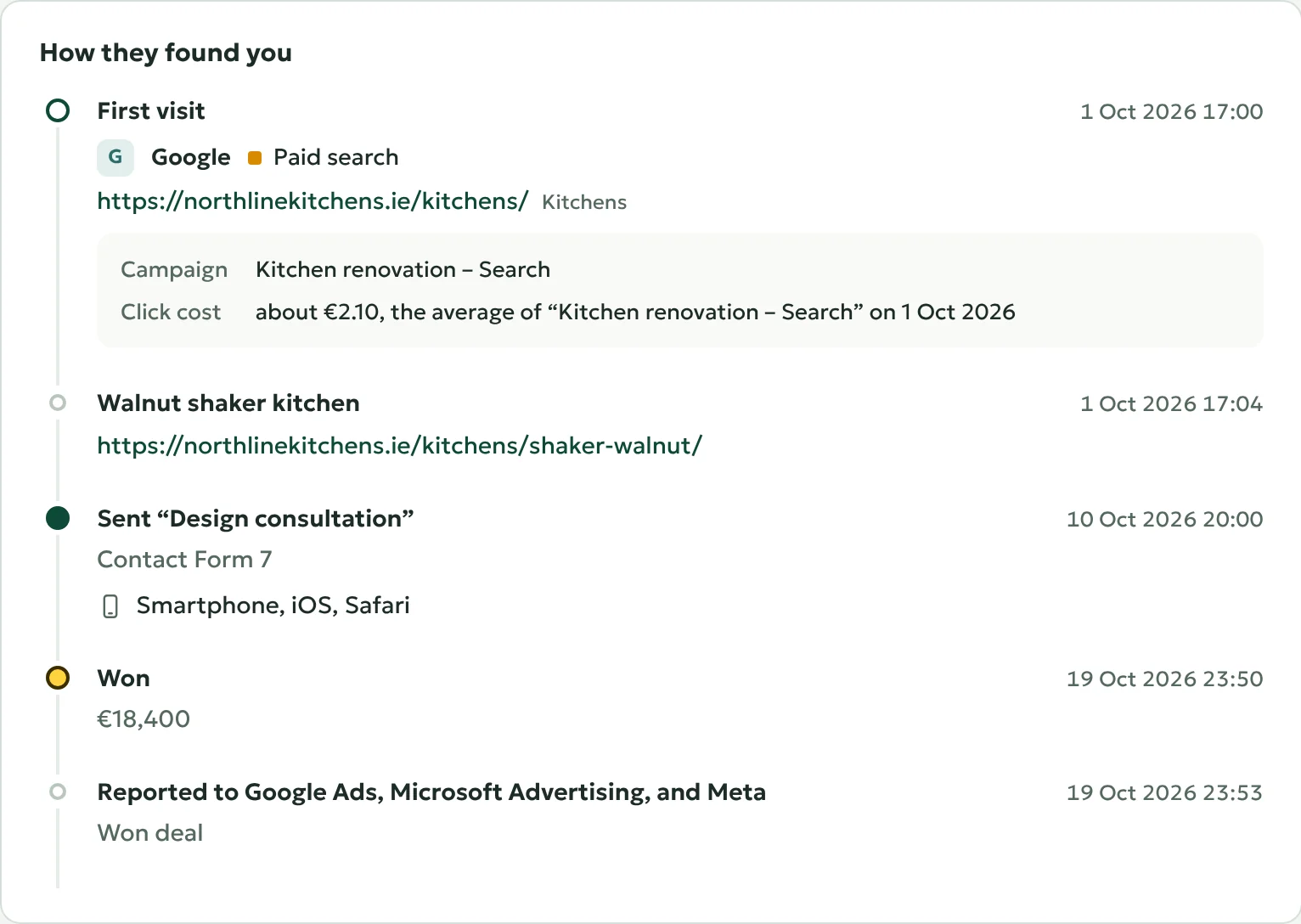
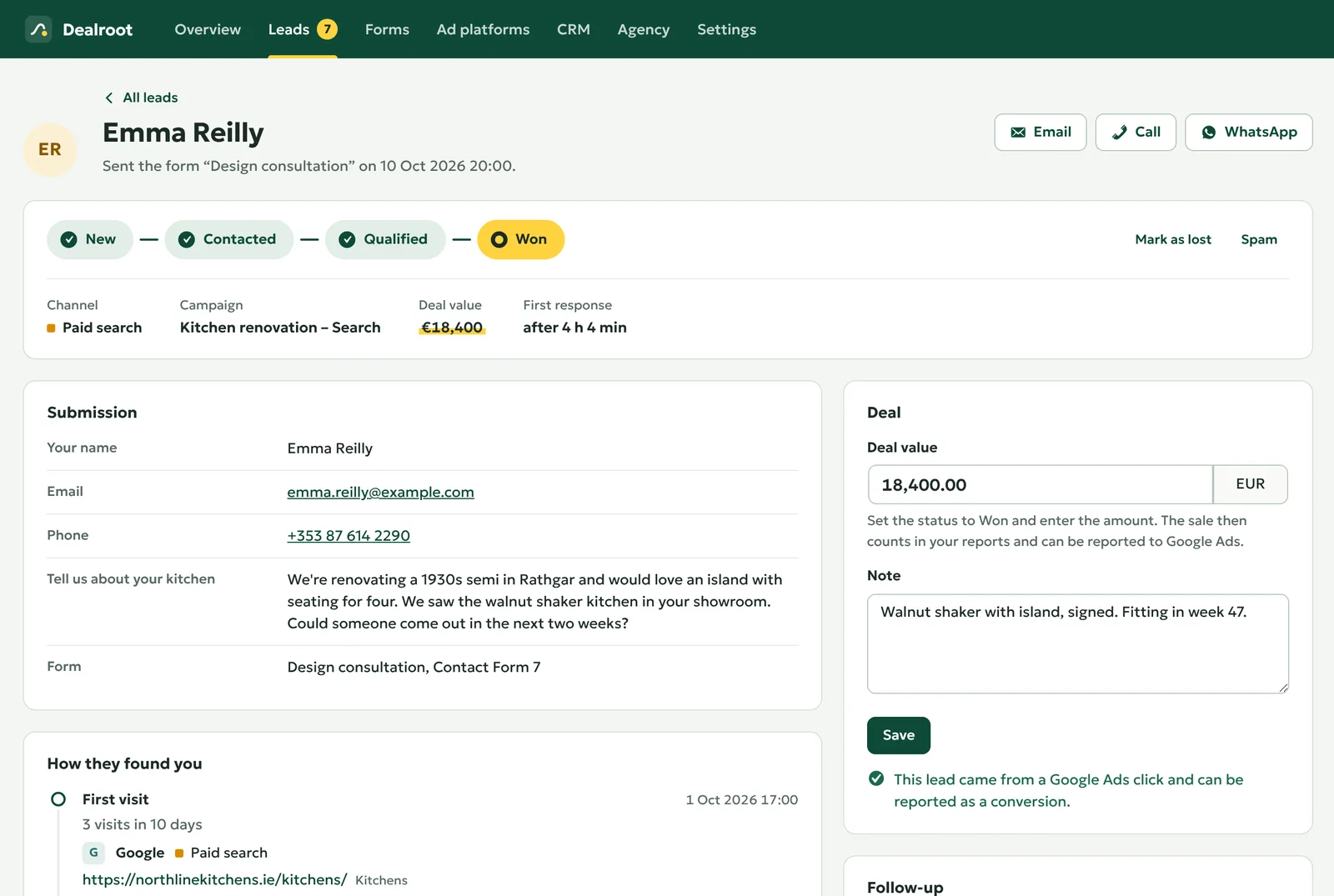
How a lead found the site: a Google ad with its campaign and click cost, a page of the site, the form sent from a smartphone, the deal won with €18,400 and reported to Google Ads, Microsoft Advertising and Meta.
  • Google Ads
  • Microsoft Advertising
  • Meta
  • HubSpot
  • Pipedrive
  • WooCommerce

From the first click to the paid invoice

Ad platforms see the form being sent, and that is where their knowledge ends. The sale happens days later, on the phone or by email. Dealroot connects the two.

  1. Dealroot keeps the click ID and the campaign in a first-party cookie, through every visit until the person gets in touch.

  2. Contact Form 7, WPForms, Elementor or any other supported form. The lead is saved with where it came from.

  3. Mark the lead as won and enter the amount, in WordPress or in HubSpot and Pipedrive.

  4. A few minutes later, to the platform that brought the visitor, with the deal value.

  5. Smart bidding learns from real sales, and your report shows the cost and return of every campaign.

Set up in ten minutes

No code, and your forms stay as they are. Each step has a guide with screenshots in the documentation.

  1. Install the free plugin

    Install the free plugin

    Add Dealroot under Plugins → Add New in WordPress and activate it. From then on, every form submission is saved with the way the visitor found you.

    Step-by-step guide

  2. Check your forms

    Check your forms

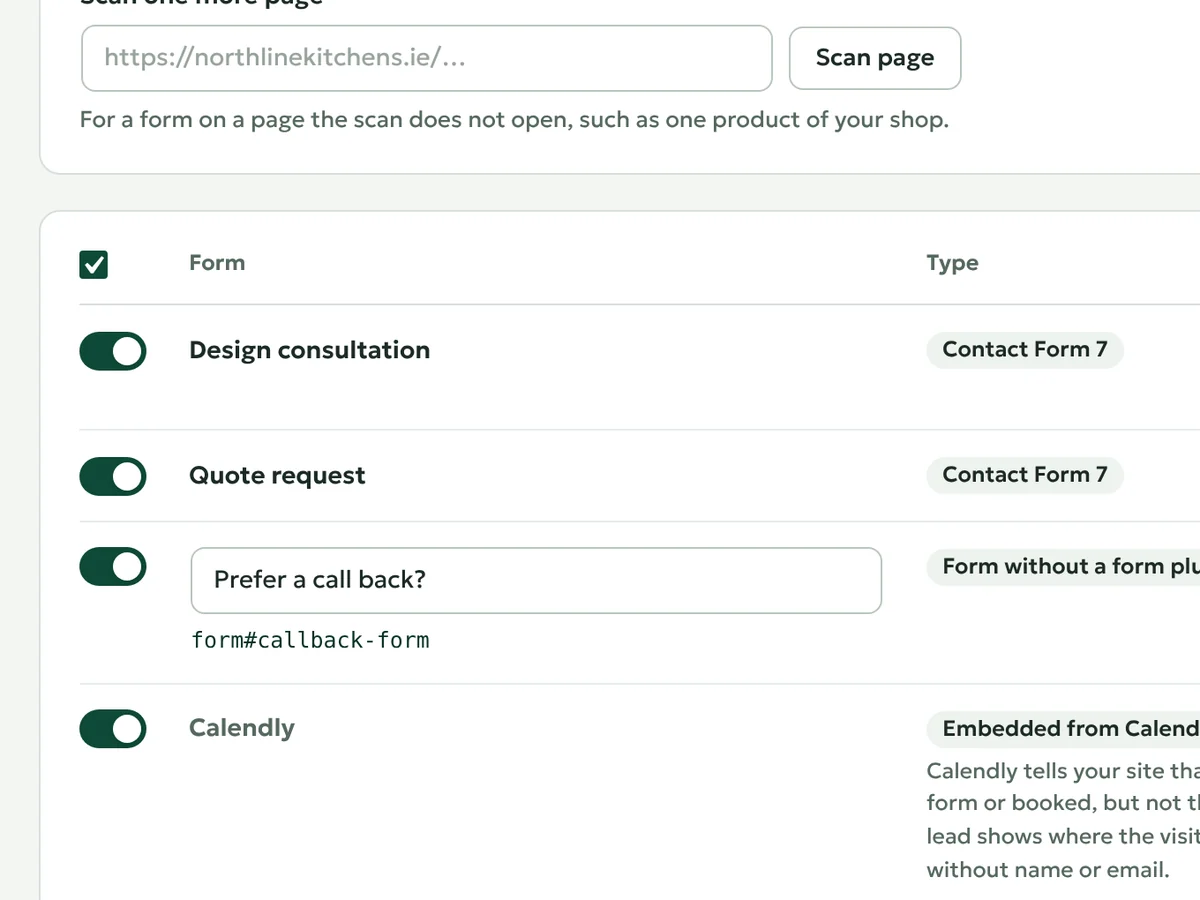
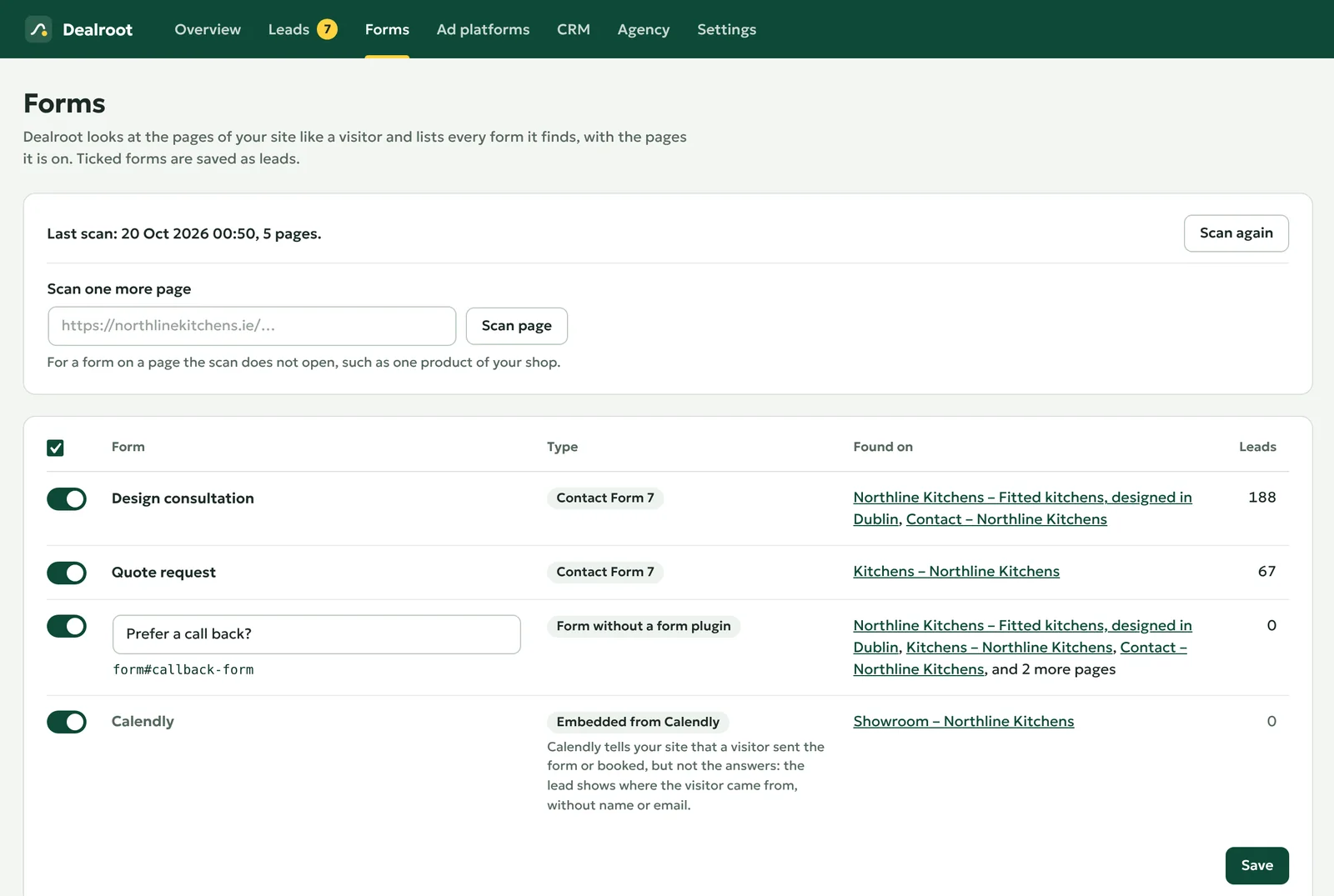
    The form scan lists every form on your site. Untick a newsletter sign-up, give the others a clear name and save.

    Step-by-step guide

  3. Connect your ad accounts

    Connect your ad accounts Every paid plan

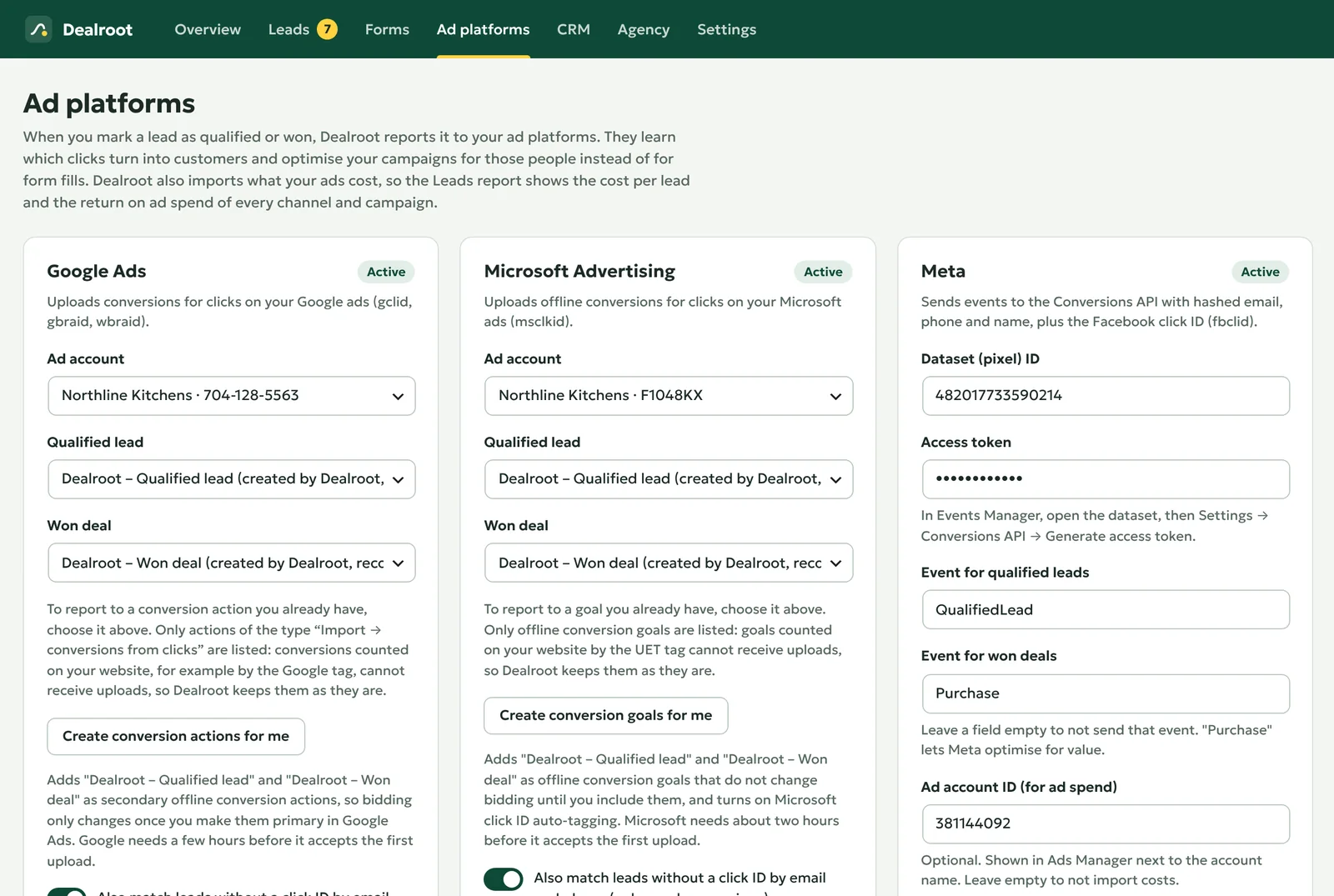
    Sign in to Google Ads, Microsoft Advertising or Meta, let Dealroot create its conversions, and send a test conversion to check that everything works.

    Step-by-step guide

Inside the plugin

Screens from the demo site of a kitchen studio. Everything happens in your WordPress admin.

Overview

Leads, won deals, revenue and return on ad spend of the period, and the leads that wait for an answer.

Overview: Leads, won deals, revenue and return on ad spend of the period, and the leads that wait for an answer.

Leads

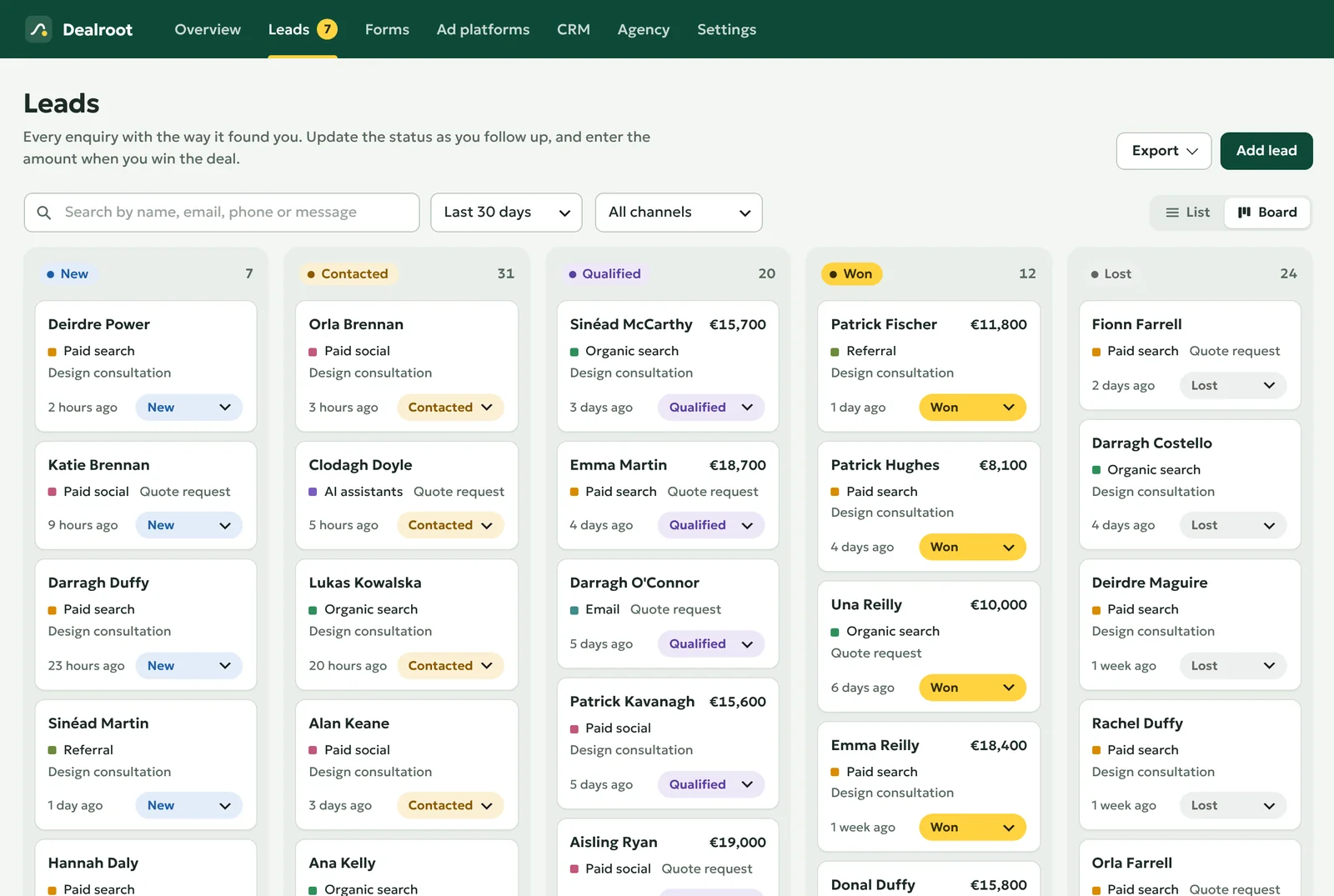
Drag a lead to the next stage. Marking it as won asks for the amount.

Leads: Drag a lead to the next stage. Marking it as won asks for the amount.

A lead

Every visit, page and ad click before the enquiry, with the device and what the click cost.

A lead: Every visit, page and ad click before the enquiry, with the device and what the click cost.

Sources

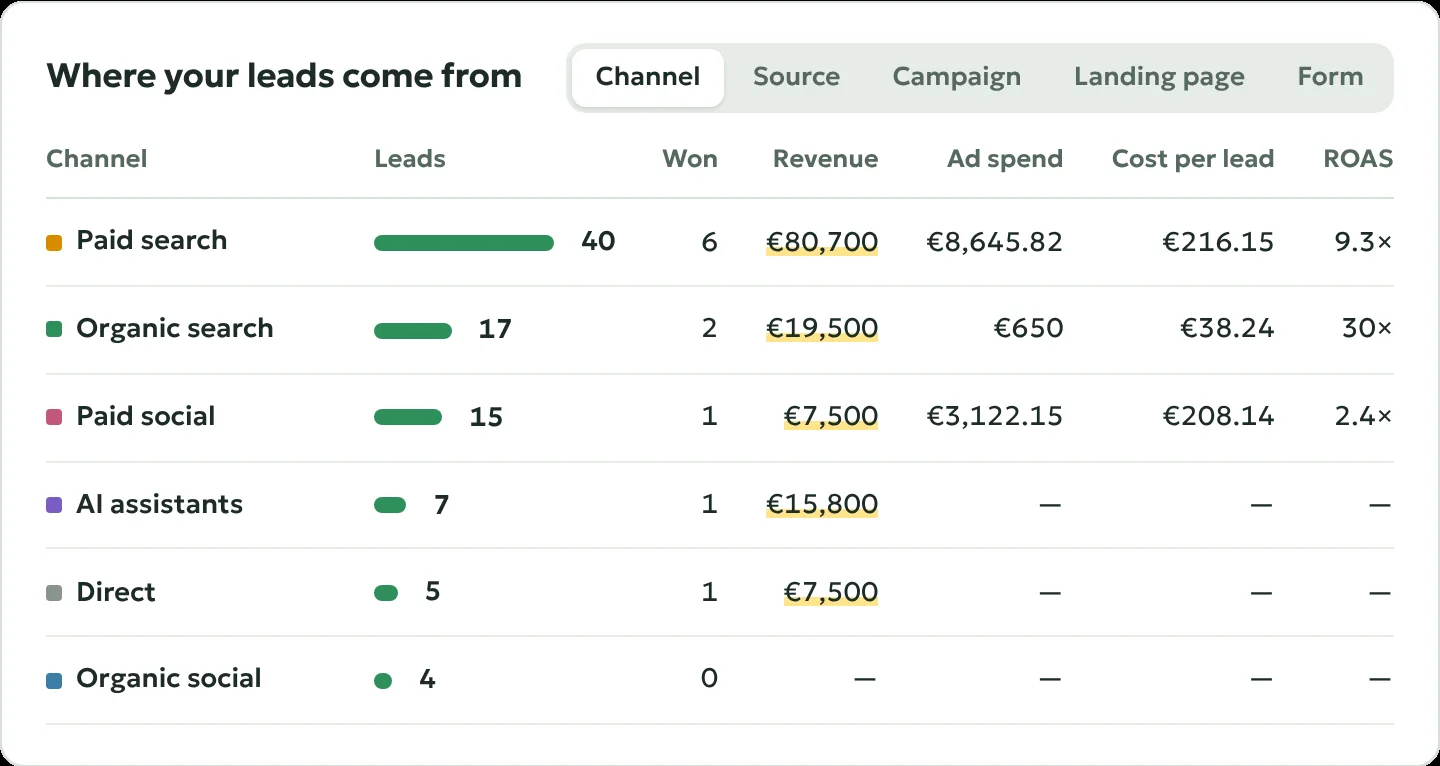
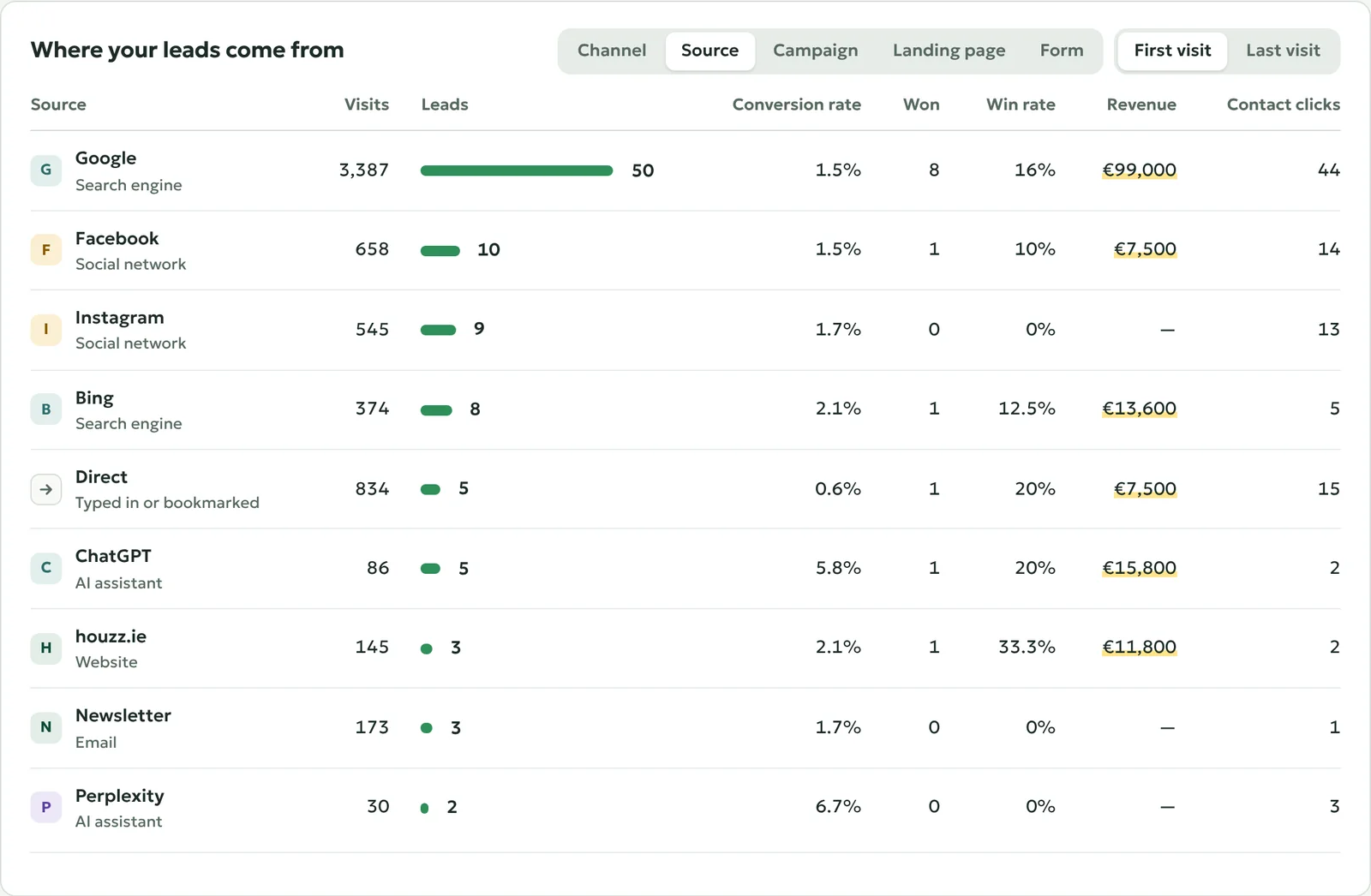
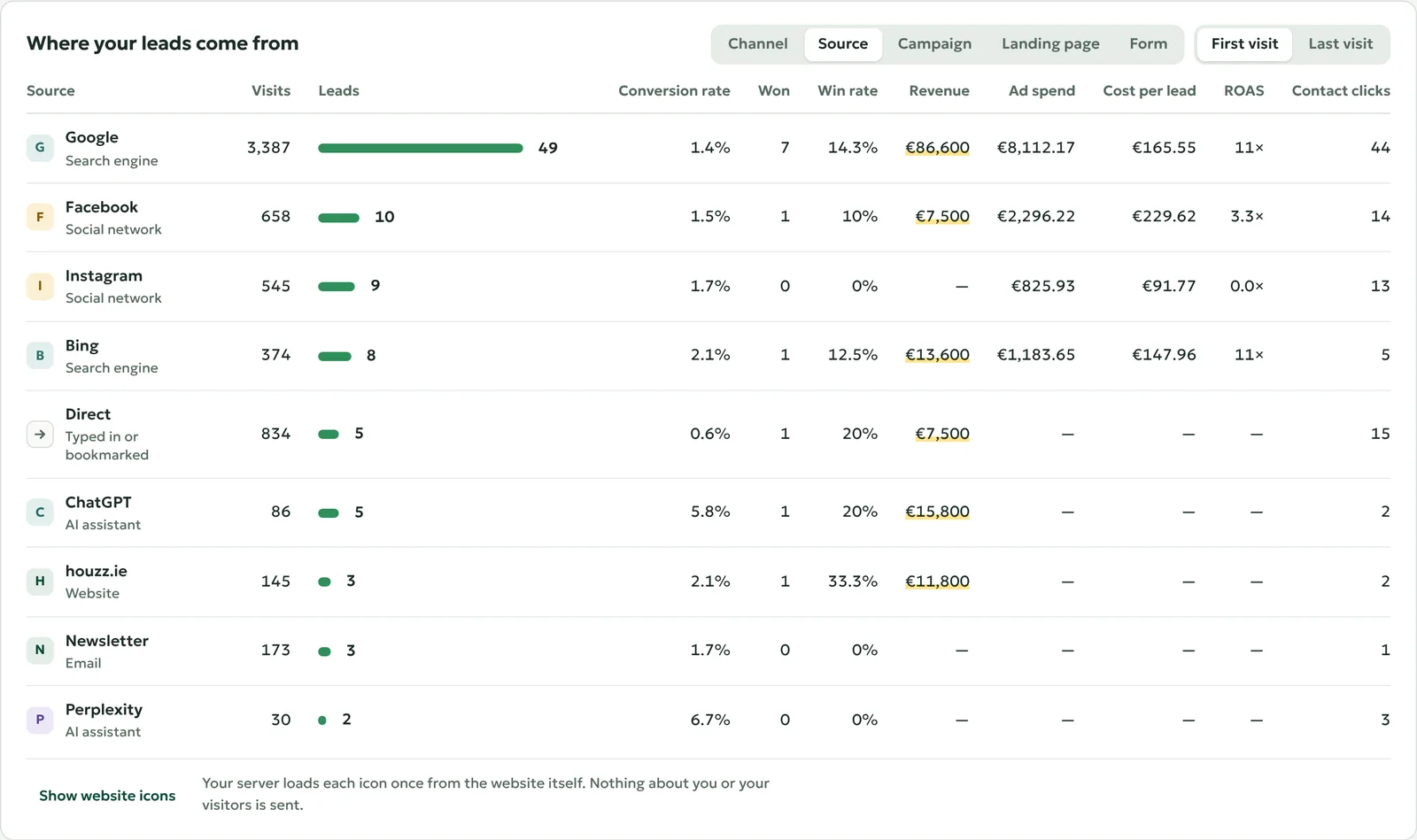
Google, Instagram, ChatGPT and every other source by name, with its leads, sales and costs.

Sources: Google, Instagram, ChatGPT and every other source by name, with its leads, sales and costs.

Forms

The forms of your site, found by the scan. Untick those that are not enquiries.

Forms: The forms of your site, found by the scan. Untick those that are not enquiries.

Ad platforms

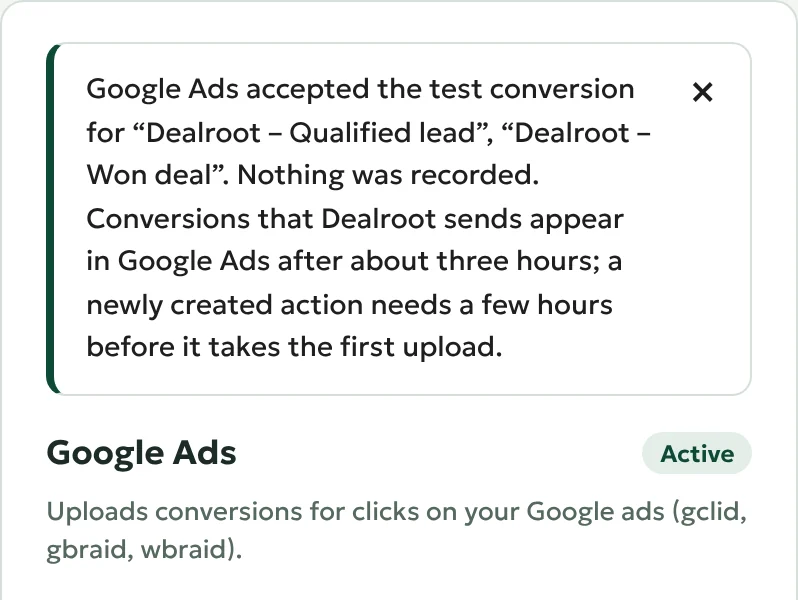
Google Ads, Microsoft Advertising and Meta, with a test conversion to check the setup.

Ad platforms: Google Ads, Microsoft Advertising and Meta, with a test conversion to check the setup.

Built for what happens after the form is sent

The free plugin shows where your leads come from. Pro connects them to your ad accounts, your costs and your CRM.

Every paid plan

Sales reported to your ad platforms

When you mark a lead as qualified or won, Dealroot sends the conversion with its value to the platform that brought the visitor. Conversions wait in a queue, are retried when a platform is busy and are never sent twice. Every lead shows what was reported where, and why something was not.

  • Google Ads through Google's Data Manager API, with enhanced conversions for leads
  • Microsoft Advertising offline conversions
  • Meta Conversions API with the Facebook click ID
  • Conversion actions and goals created for you after signing in
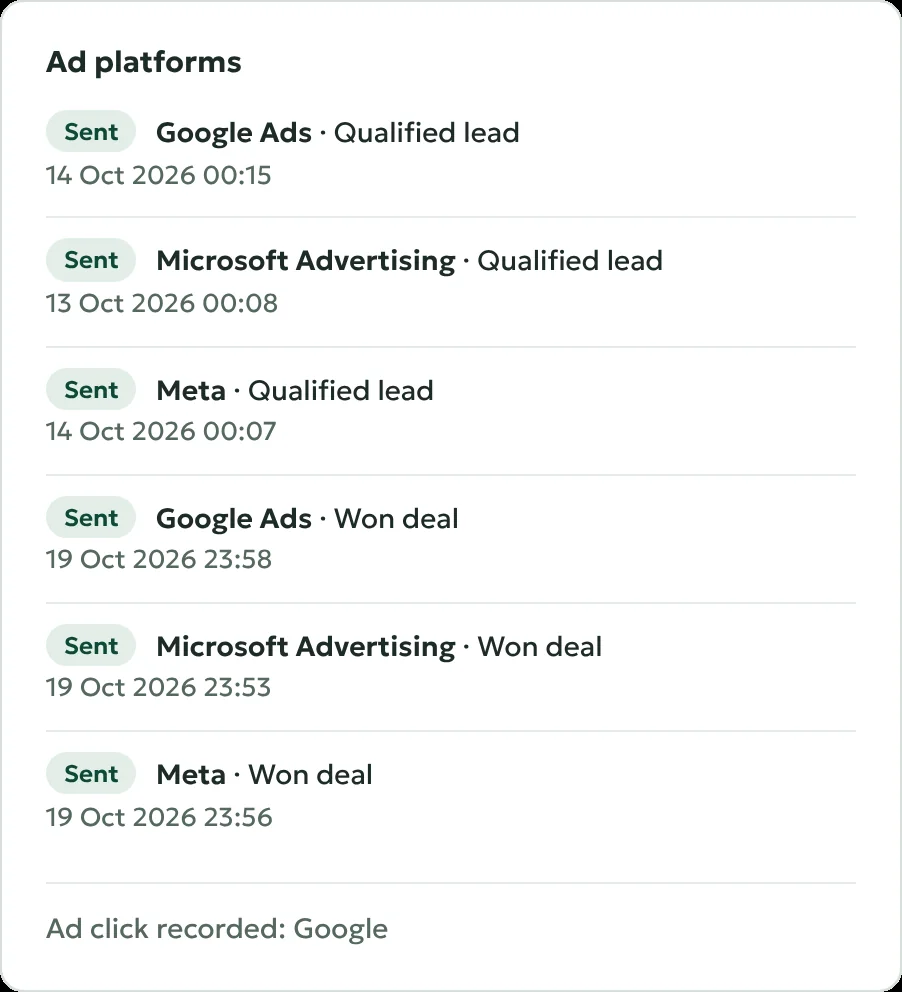
How it works: Google Ads

Sales reported to your ad platforms

Every paid plan

What each lead and customer cost

Dealroot imports the daily spend of your campaigns from Google Ads, Microsoft Advertising and Meta. The report shows the cost per lead, the cost per customer and the return on ad spend for every channel, source and campaign. Add your margins and it shows the profit.

  • Campaign and ad group found for every Google click, even without UTM tags
  • Monthly costs for SEO, flyers or an agency, so organic channels get a cost per lead too
  • Report profit instead of revenue, so your ads bid for profitable sales

How it works: Ad spend and return on ad spend

What each lead and customer cost

Business plan

HubSpot and Pipedrive, in both directions

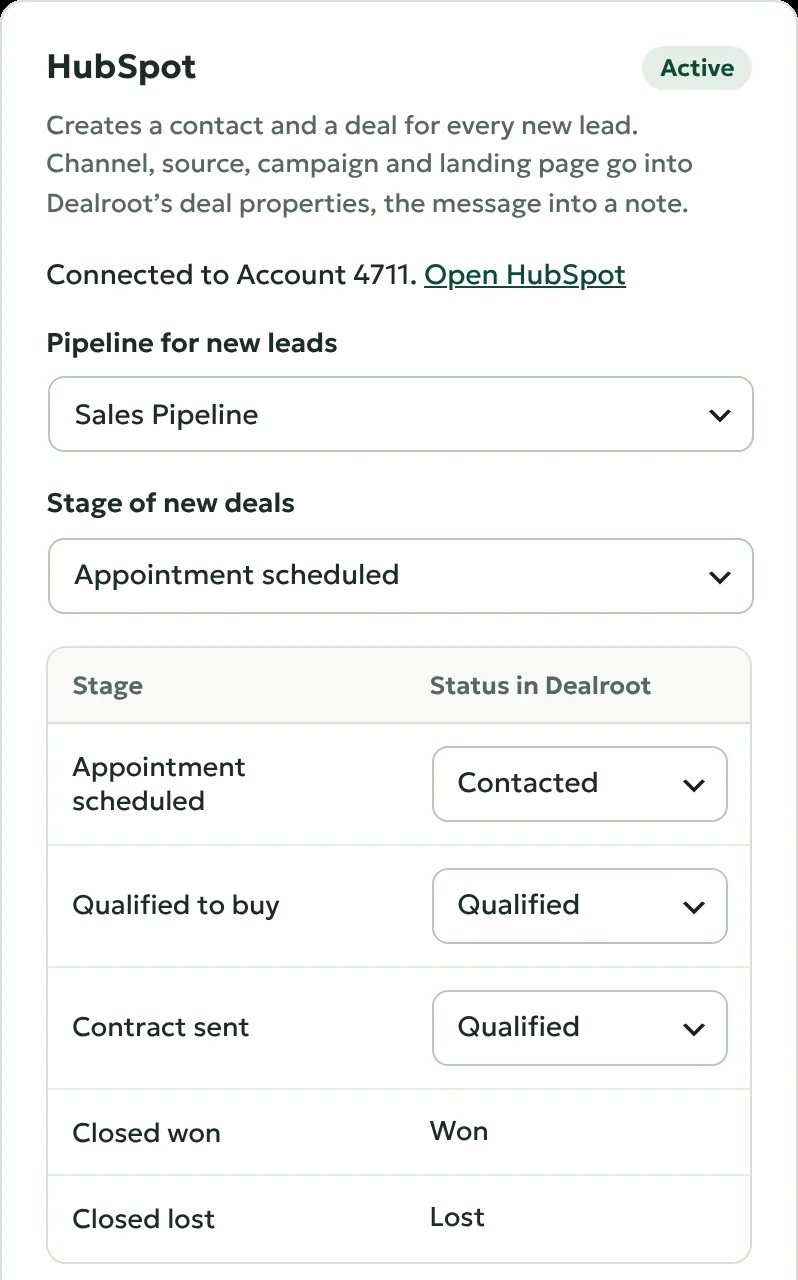
Every new lead becomes a contact and a deal, with its channel, source, campaign and landing page in their own deal fields. When your team wins the deal in the CRM, Dealroot marks the lead as won with the deal amount and reports the sale to your ads.

  • You choose which stage stands for which status
  • Existing contacts are found by email address or phone number
  • Any other CRM can send statuses back through Make, Zapier or n8n

How it works: HubSpot and Pipedrive

HubSpot and Pipedrive, in both directions

Agency plan

All client sites on one screen

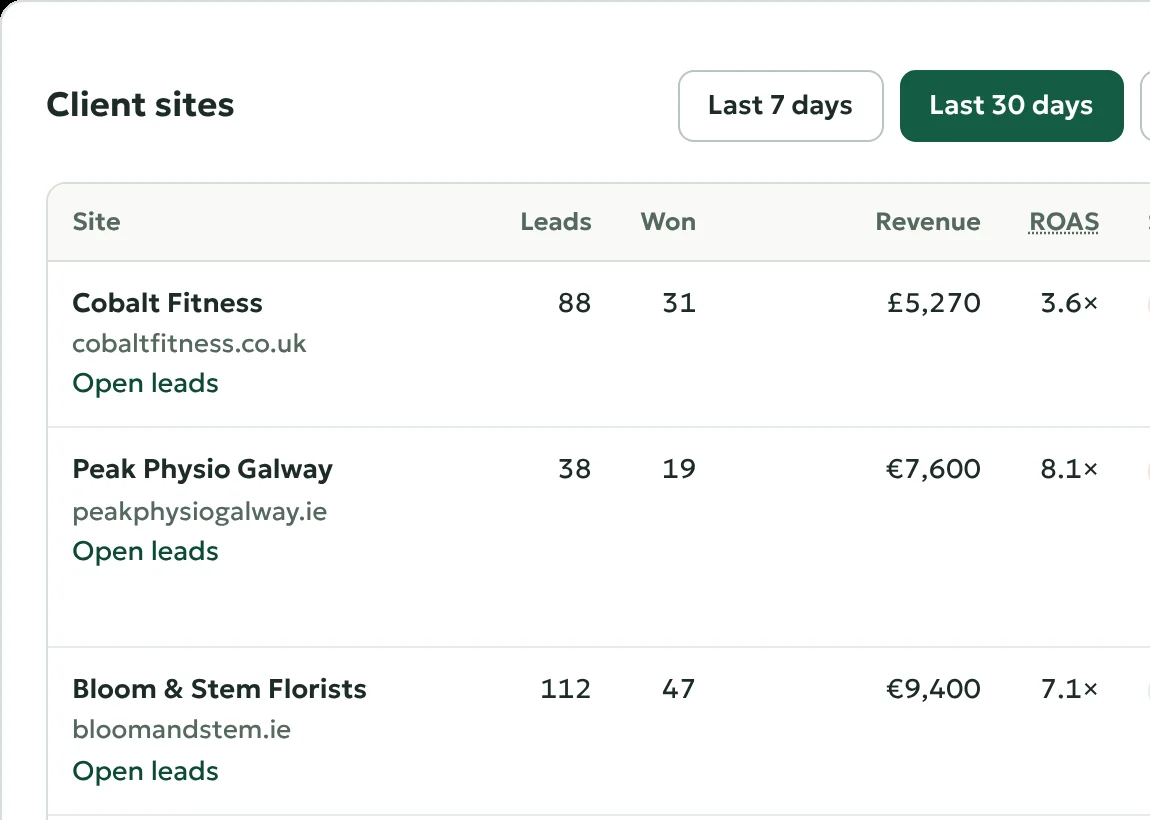
The agency dashboard lists every client with leads, won deals, revenue, ad spend and return, and says what needs attention: conversions that fail, connections that were revoked, sites that stopped reporting and forms that stopped sending leads.

  • Sites join with a code, and only totals leave a client site
  • Your agency's name on every screen, in emails and in the plugin list
  • A report of the past month to each client, under your name

How it works: Agency dashboard

All client sites on one screen

Every paid plan

Ask your AI assistant about your leads

Connect an assistant such as Claude to your WordPress site through MCP, and ask it which campaigns brought customers this month. With Pro it can also act on what it finds: change a status, add a note, assign a lead or plan a follow-up.

  • Reports and leads are readable with the free plugin
  • Statuses, notes, owners and follow-ups with Pro
  • Built on the WordPress Abilities API, so the assistant can do only what the abilities allow

How it works: AI assistants

Every paid plan

Spam stays out of your numbers

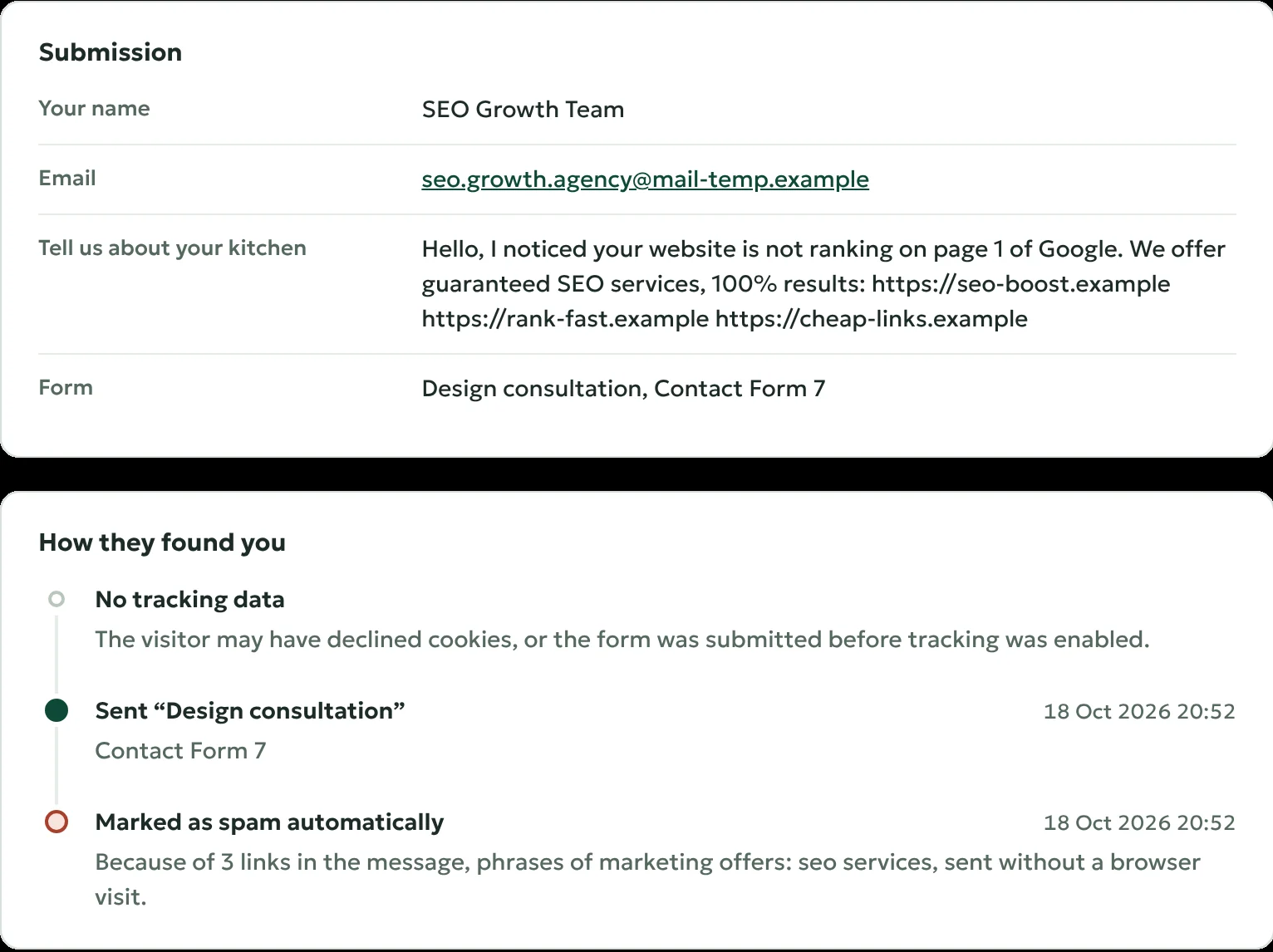
Sales pitches, link lists, throwaway addresses and bot submissions are marked as spam, with the reasons shown on the lead. Spam sends no notifications, does not count in reports and is never reported to your ads.

  • Runs on your site, nothing is sent to another service
  • Your own words for the block list
  • "Not spam" brings a lead back in one click

How it works: Spam filter

Spam stays out of your numbers

Every paid plan

Nobody forgets to call back

Give every lead an owner and a follow-up date. Dealroot emails a reminder on that day, and when a new lead has waited 24 hours without an answer. New leads and won deals can also appear in Slack or Microsoft Teams.

  • Reminders by email to the owner of the lead
  • Slack and Microsoft Teams channels with the source of each lead
  • Response time per lead and for your team

How it works: Notifications

More in the paid plans

  • Scheduled upload for Google Ads

    Google Ads downloads your conversions from your site once a day, no sign-in needed.

  • Enhanced conversions

    Leads without a click ID are matched by their hashed email address and phone number.

  • Conversion status on every lead

    What was sent to which platform, whether the platform could use it, and why not.

  • Ad spend and return on ad spend

    Cost per lead, cost per customer and ROAS for every channel, source and campaign.

  • Profit and POAS

    A typical margin, margins per product category or the WooCommerce cost of goods.

  • Other monthly costs

    An SEO agency, printed flyers or a trade fair, once or every month.

  • Slack and Microsoft Teams

    New leads and won deals in a channel, with their source and a link to the lead.

  • Owners, follow-ups and reminders

    A reminder on the follow-up date and when a new lead waited 24 hours.

  • Report to an agency dashboard

    Join the dashboard of your agency with a code. Only totals leave your site.

  • Status updates from any CRM Business

    Salesforce, Zoho CRM, monday.com and others through Make, Zapier or n8n, by lead ID or email address.

  • White label Agency

    Your name instead of Dealroot on every screen and in emails; settings only for the users you choose.

  • Monthly client report Agency

    On the first of the month, each client gets the past month’s leads, sales, ad spend and top campaigns.

Start free. Upgrade when your ads need it.

Dealroot is free on WordPress.org and useful on its own, with or without ads. Pro adds the connections to your ad accounts and CRM, and keeps every lead you collected before.

Get Dealroot on WordPress.org

  • Every submission saved with its channel, source, campaign and landing page
  • Reports by channel, campaign, page and form, with conversion and win rate
  • Phone, WhatsApp and email clicks counted per channel
  • A simple pipeline: new, contacted, qualified, won, lost
  • Telegram notifications and webhooks for Make, Zapier and n8n
  • Conversion files to upload to Google Ads, Microsoft Advertising and Meta by hand
The report by source in the free plugin: every search engine, social network, AI assistant and website by name, with its leads, sales and revenue.

Works with the tools you already use

Your forms stay as they are, and leads go where your team already works.

Forms and page builders

Every submission is saved as a lead, with the way the visitor found you.

  • Contact Form 7
  • WPForms
  • Gravity Forms
  • Fluent Forms
  • Ninja Forms
  • Formidable Forms
  • Forminator
  • JetFormBuilder
  • Everest Forms
  • WS Form
  • SureForms
  • MetForm
  • HappyForms
  • Jetpack Forms
  • Elementor Pro
  • Divi
  • Bricks
  • Beaver Builder
  • Thrive Architect
  • Kadence Blocks
  • Spectra
  • Otter Blocks
  • Mailchimp for WordPress
  • MailPoet
  • Ultimate Member
  • HubSpot forms
  • Tally
  • Typeform
  • Calendly

Ad platforms

Qualified leads and won deals are reported with their value, and the ad spend comes back for your report.

  • Google Ads Pro
  • Microsoft Advertising Pro
  • Meta Pro

CRM, shop and automation

New leads become deals, and deals won there are reported to your ads.

  • HubSpot Business
  • Pipedrive Business
  • WooCommerce
  • Make
  • Zapier
  • n8n

Notifications

Each new lead with its source, where your team already talks.

  • Telegram
  • Slack Pro
  • Microsoft Teams Pro

AI assistants

Ask about your leads and reports through MCP and the WordPress Abilities API.

  • Claude
  • MCP Adapter

Any other form, from Breakdance, Avada or your theme, after a click in the form scan or with data-dealroot on the form tag.

Lead data stays on your site

Names, email addresses and messages are stored in your WordPress database. What has to leave it, leaves it in the smallest form the platforms accept.

What Dealroot Cloud stores, and what it does not

  • Email addresses and phone numbers are hashed with SHA-256 on your site before an ad platform receives them
  • Dealroot Cloud passes conversions on to Google and Microsoft without keeping them
  • HubSpot and Pipedrive get lead data straight from your site
  • Tracking can wait for cookie consent, through the WP Consent API or your own banner
  • Leads are deleted after the period you choose, and work with the WordPress export and erase tools
  • Access tokens are stored encrypted

Plans

Every paid plan reports to Google Ads, Microsoft Advertising and Meta. Pay per year, or month by month.

Launch offer

30% off for our first 100 customers, on the first payment and on every renewal for as long as you stay. The code is applied at checkout.

Coupon code: EARLY30

  • Free

    See where your leads come from

    €0 forever

    Unlimited sites

    Download
    • Lead source on every form submission
    • 25 form plugins and page builders
    • Reports by channel, campaign and page
    • Phone and WhatsApp clicks
    • Telegram and webhooks
    • Conversion files to upload by hand
  • Business

    For a few sites and your CRM

    €299 per year

    €29 per month

    €209.30 with the launch offer

    €20.30 with the launch offer

    3 sites

    Buy Business

    Everything in Pro, plus:

    • HubSpot and Pipedrive in both directions
    • Won deals in the CRM reported to your ads
    • Status updates from any CRM through Make, Zapier or n8n
  • Agency

    For agencies and their clients

    €599 per year

    €59 per month

    €419.30 with the launch offer

    €41.30 with the launch offer

    25 sites

    Buy Agency

    Everything in Business, plus:

    • Dashboard of all client sites
    • White label with your agency's name
    • Monthly report email to each client

Prices exclude VAT, which is added at checkout where it applies. Payments, invoices and refunds are handled by our reseller Freemius. If Pro does not work out for you, ask for a refund within 14 days.

Compare all features by plan

Questions

Do I need the free plugin as well?

Yes. Dealroot Pro is an add-on: the free plugin from WordPress.org collects the leads and their sources, Pro connects them to your ad platforms and CRM. Install both, and enter your license key when Pro asks for it after activation.

Do I have to change my forms?

No. Dealroot reads the source of the visit when your form plugin processes a submission. There are no hidden fields to add. Forms built without a form plugin are picked up by the form scan, or with a data-dealroot attribute on the form tag.

Do I need a Google Ads developer token or my own Google Cloud project?

No. Google Ads and Microsoft Advertising are connected through Dealroot Cloud, which holds the developer access these platforms require. You sign in with your own ad account and choose it from a list; Dealroot never sees your password.

Does it work if I do not advertise yet?

Yes. The free plugin shows which search engines, social networks, AI assistants, newsletters and websites bring you enquiries and customers. Pro becomes useful when you run ads, use a CRM or manage sites for clients.

What happens when my license ends?

Nothing is deleted. Leads, reports and settings stay, and conversions wait in the queue. Renew within 90 days and they are sent (Meta accepts them for 7 days). The free features keep working without a license.

Can I get my money back?

Yes. If Pro does not work for you, write to us within 14 days of the purchase and you get a full refund.

Is my lead data sent to Dealroot?

No. Leads are stored in your WordPress database. To report a conversion, Dealroot Cloud passes the click ID, the value and hashed contact details on to Google or Microsoft without storing them. Meta, HubSpot and Pipedrive receive their data straight from your site.

Find out which campaign brought your last customer

Install the free plugin today. When you want your ads to learn from your sales, upgrade in a minute and keep every lead you collected.

Choose a plan Get the free plugin